
Model Context Protocol
Your next event
is one sentence away.
Connect Claude — or any MCP client — to your Aion account. From there you ask in plain words: create it, illustrate it, publish it, and tell me how many people signed up.
› Publish an event on 15 October in Brescia about Local AI vs Cloud AI, night-time cover
Local AI vs Cloud AI
Wed 15 Oct · 7:00pm
Brescia · Talent Garden
draft created · not public yet
And then?
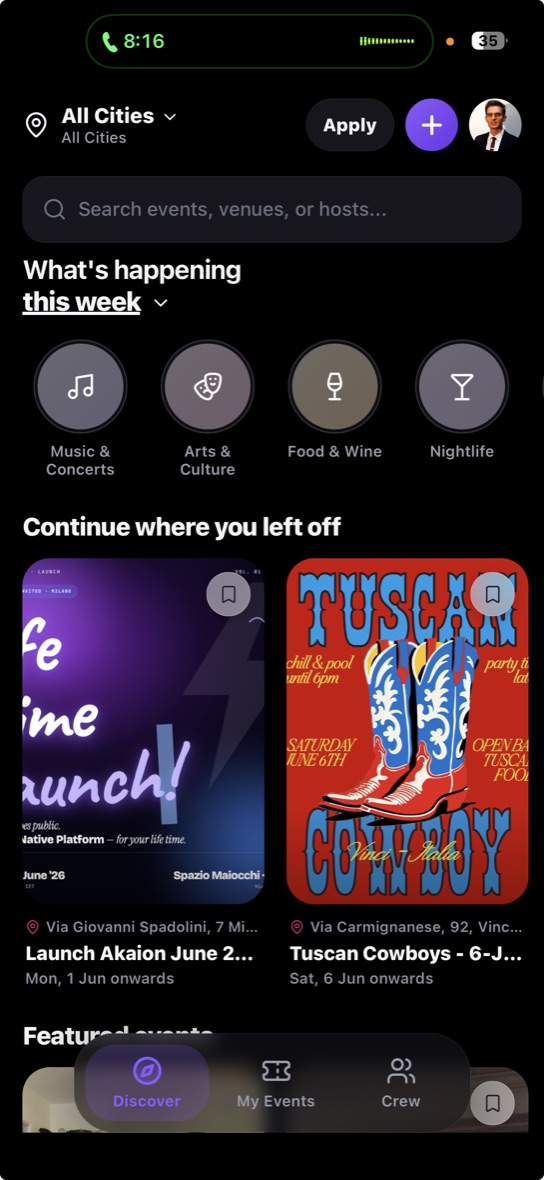
The moment you publish, it is already in the app.
Same card, same cover, same public address. There is no second step to do by hand: what you asked for in words is what people open on their phone.
13 tools
What it can do, each one by name.
list_my_communities
The communities you run, with their id.
create_public_event
Title, when, where, price, capacity. It starts as a draft.
design_event_cover
Composes the cover in the topic’s colour. Free.
generate_event_cover
Generates one from a description and applies it.
get_event_template
The shape of a questionnaire, ready to fill in.
set_registration_questions
The questions: types, per-person prices, conditions, pages.
set_page_sections
Day-by-day itinerary, gallery, video, FAQ.
set_community_sections
The same blocks, but the community’s.
publish_public_event
From here the address is live and the event is on Discover.
update_public_event
Changes only the fields you pass.
list_my_public_events
What you have coming up, or what has already been.
event_registrations
Sign-ups, their status and the questionnaire answers.
platform_analytics
The platform-wide picture. Admins only.
Handing over the keys
Connecting a model to your own account is a serious thing.
So the door is deliberately narrow, and you can see how it is built from the outside.
No password in the client
OAuth 2.1 with PKCE. The client never sees your credentials: it opens a page on Aion, you authorise, and it receives a token you can revoke.
Nothing publishes itself
An event always starts as a draft. Until you ask for it to be published, nobody sees it — not even by accident.
You see who is asking
The authorisation screen tells you which client is knocking and what it will be able to do. It is not a box to tick: it is a sentence to read.
One line, and you are talking to it.
No key needed: the client registers itself and sends you to authorise in the browser.
claude mcp add --transport http aion https://api.aionvibes.com/mcp/Using a client other than Claude? The manual has the endpoints.